- Xiamen Lujiang Technology Co., Ltd.

 EN
EN
Quick Links

Home / Blog / Category 2

The 2025 Tattoo Stencil Printer is a super cool, up-to-date tool that makes creating tattoo stencils way easier. In this blog post, we're going to walk you through each and every step of the process, starting from when you first get an idea or come up with design images, then moving on to actually printing the stencil, and finally applying it to the skin during your tattoo session. Whether you're a pro artist who wants to make your workflow smoother or a total beginner ready to dive in, this printer takes all the stress out of making stencils. It ensures that every time you transfer the stencil, it's precise and clean, so you can focus on nailing your tattoo art without any extra hassle.
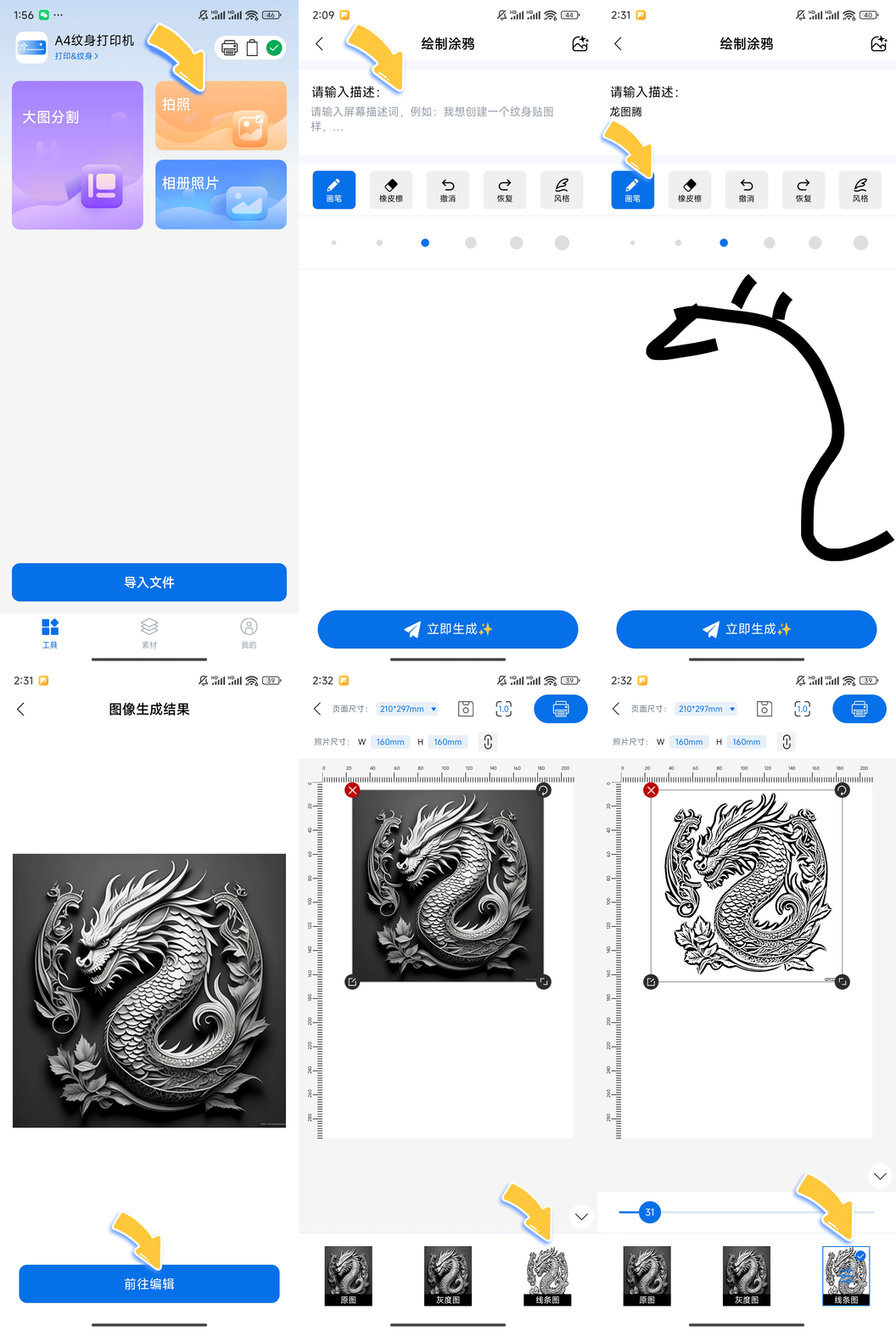
Step 1 : Creating Your Tattoo Design with the App: The printer comes with a special app that lets you make your own tattoo design by describing it in words. Once you have a rough idea of what you want, you can use the app's tools to tweak and improve the design—like switching up the colors, making parts bigger or smaller, or adding little extra details—until it looks exactly how you picture it. This means you can easily customize your tattoo design without needing to have a lot of graphic design knowledge, so you get to have complete control over how it looks before you print it.
Step 2 : When it comes to printing your tattoo stencil, the first step is to make sure your printer is connected. Since it uses Bluetooth, pairing it with your phone or tablet is pretty straightforward—just follow the usual Bluetooth pairing steps on your device, and you should be good to go in no time. There are two straightforward ways to connect your printer. The first option is to go into your device's Bluetooth settings, find the printer in the list of available devices, and connect to it directly. The second method is to use the QR code that's included in the app—simply scan that QR code, and the printer will be added to your device quickly and easily without any extra steps.Next, think about the paper size. The printer works best with standard A4-sized tattoo transfer paper. This means your design will print out neatly without needing any cutting or trimming, which makes the whole process smooth and hassle-free.
If you're aiming to make professional-grade tattoo stencils, the 2025 Tattoo Stencil Printer is absolutely a tool you should think about. It's designed to help you produce clean, precise stencils that can elevate your tattooing process, whether you're a seasoned artist or just starting out. With features tailored for tattoo professionals, this printer can save you time and effort, ensuring your stencils are consistent and ready to use right away. Considering the quality and efficiency it brings to stencil creation, it definitely stands out as a worthwhile investment for anyone serious about their tattoo work. It features an easy-to-use app that lets you design your stencils directly on your phone or computer, and you can easily adjust the print settings to get exactly what you need—whether that's changing the size of the design or modifying the line thickness. A nice added benefit is that it works perfectly with regular A4 tattoo paper, so you won't have to go out of your way to buy special supplies. Overall, this printer streamlines the entire stencil-making process, making it much faster and more straightforward compared to traditional methods.

Xiamen Lujiang Technology provides portable thermal printers and OEM/ODM services for global markets. Our innovative hardware and software solutions deliver reliable, inkless printing. Trusted by businesses worldwide. Contact us today.